

What resumes actually need in 2026
Let’s be real: the resume game has changed. It’s not enough to simply list your experience anymore. Applicant Tracking Systems (ATS) are far more advanced than they were even a few years ago, and recruiters are spending less time on each individual application. A dense, text-heavy document just won't get a second look. It feels almost archaic now to think a basic template once sufficed.
The rise of AI-powered screening tools means your resume needs to be optimized for keywords and readability. But there's a counter-current too. Recruiters are also looking for resumes that demonstrate personality and attention to detail. They want to see a document that feels human, not just a collection of buzzwords. It's a tricky balance, and one many free resume builders fail to address.
Think of your resume as a pitch. It has to work for the software scanning it and the person reading it. That means clean formatting and specific keywords without making it look like a robot wrote it. If you're still using a blocky, text-heavy layout from ten years ago, you're making it easy for recruiters to skip you.
The real cost of free builders
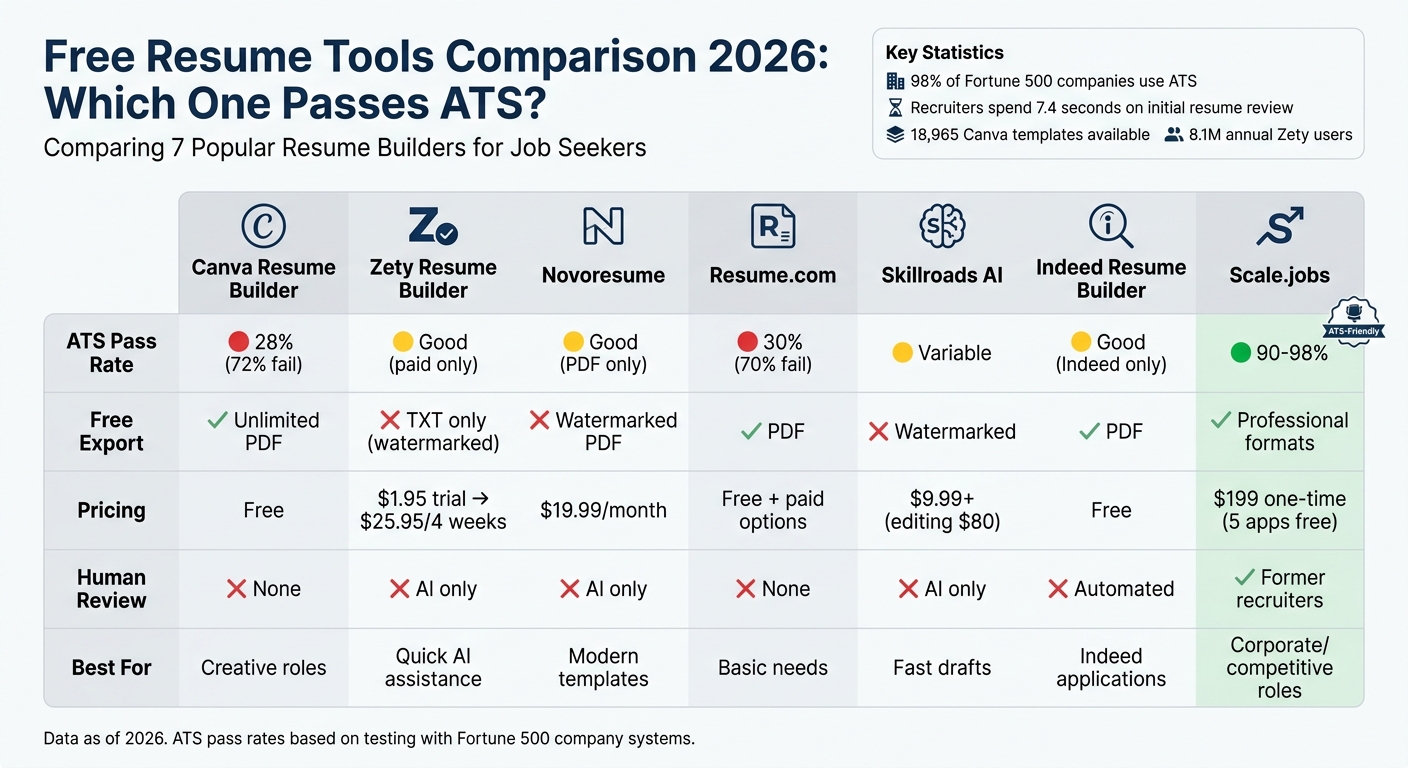
Free builders are tempting because nobody likes paying for a document they might only use once. Sites like Canva or Resume.com are fine for a quick start, but the trade-offs are real. I've seen plenty of people get stuck behind paywalls right when they're ready to hit download.
Typically, free builders severely limit your template choices. You're often stuck with a handful of basic designs that don’t exactly scream "professional." Many force a watermark onto your finished resume, which looks…well, less than ideal. Customization options are also usually restricted – you might not be able to change colors, fonts, or section layouts to truly reflect your personal brand. And let's not forget the constant upsells for premium features, constantly reminding you of what you aren’t getting.
Then there is the data issue. Many free tools make money by selling your info. I'm not a fan of how some services pass 'anonymized' data to recruiters or third parties without a clear opt-out. When the product is free, your work history is usually the currency.
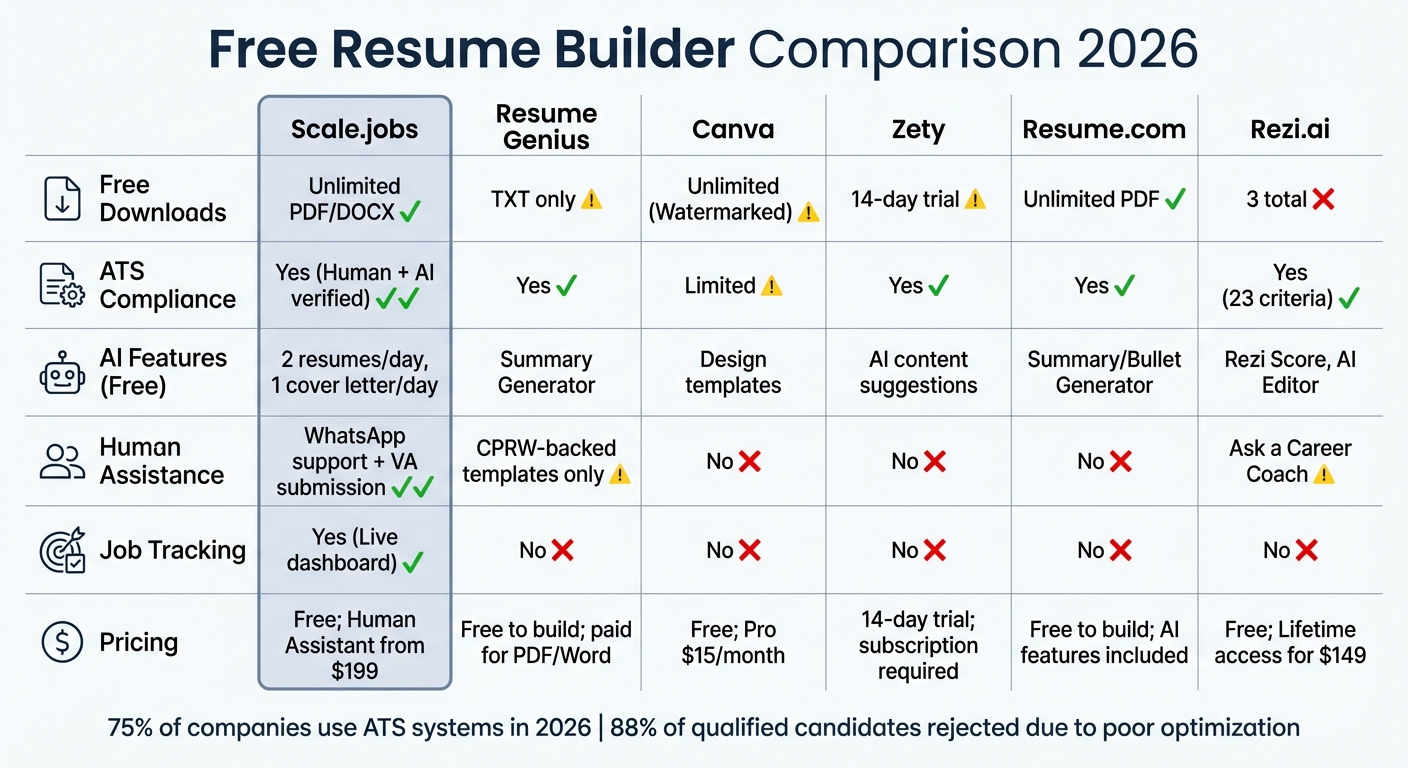
Here's a quick look at what you can expect. | Feature | Resume.com (Free) | Canva (Free) | MyPerfectResume (Free Trial) | |---|---|---|---| | Template Variety | Limited | Moderate | Moderate | | Customization | Basic | Moderate | Limited | | Watermark | Yes | Sometimes | Yes | | Data Privacy | Concerning | Concerning | Concerning |
Resume Builder Comparison - 2026
| Feature | Resume.com (Free) | Canva (Free) | Zety (Free) | Dump CV |
|---|---|---|---|---|
| Template Variety | Limited selection | Good visual options | Basic, functional focus | Modern, industry-specific |
| Customization Options | Restricted editing | Design-focused, less content control | Moderate, some limitations | Extensive, granular control |
| ATS Compatibility | Potential issues with parsing | Design emphasis may hinder ATS | Generally good, but varies | Optimized for ATS readability |
| Watermarks | Present on free downloads | Canva branding often visible | Present on free downloads | None |
| Data Privacy | Data collection practices noted | Review Canva's privacy policy | Data collection for upselling | Prioritizes user data security |
| Customer Support | Limited free support | Community forum focused | Basic support options | Dedicated support resources |
Qualitative comparison based on the article research brief. Confirm current product details in the official docs before making implementation choices.
How Dump CV handles the heavy lifting
At Dump CV, we built our platform with a specific goal in mind: to create resumes that get results. We’re not interested in just providing a tool to generate a document; we want to help you land interviews. That means focusing on both ATS compatibility and visual appeal. It’s not an either/or situation, and we believe that’s where many other builders fall short.
We’ve invested heavily in a collection of modern, professional resume templates designed in collaboration with recruiters and hiring managers. These aren't just aesthetically pleasing designs; they're strategically crafted to highlight your skills and experience in a way that resonates with potential employers. We didn't just pick some nice fonts and call it a day. We analyzed what works.
Our outlining system guides you through the process of including the right information in the right format. We provide suggestions and examples to help you articulate your accomplishments and quantify your impact. And our customization options allow for genuine personalization without sacrificing ATS compatibility. You can adjust colors, fonts, and section layouts to reflect your personal brand, but we’ll warn you if you’re about to do something that might cause issues with an ATS.
Ultimately, we believe a great resume is a partnership between you and the tool you’re using. We provide the framework and the guidance, but you bring the experience and the personality. We’re here to empower you to create a resume that truly represents your value.
Getting past the digital gatekeepers
Let’s talk about Applicant Tracking Systems (ATS). These are the software programs that many companies use to screen resumes before a human ever lays eyes on them. They’re not looking for creativity or artistic flair; they’re looking for specific keywords and a structured format. Think of them as digital gatekeepers.
Dump CV is specifically engineered for ATS compatibility. We use clean code, proper formatting, and keyword optimization suggestions to ensure your resume is easily parsed by these systems. We avoid fancy graphics, unusual fonts, and complex layouts that can confuse the ATS. We prioritize readability for both humans and machines.
Here's a quick checklist of things to avoid to keep your resume ATS-friendly: Tables (can be misinterpreted) Text boxes (often ignored) Headers and footers (information may be lost) Images (ATS can't read text within images) * Uncommon fonts (stick to standard fonts like Arial, Calibri, or Times New Roman)
Customization Without Chaos: Finding Your Voice
ATS compliance doesn’t mean sacrificing your personal brand. It’s about finding a balance between meeting the requirements of the system and showcasing your unique personality. Dump CV offers a good degree of customization – you can adjust color schemes, font choices, and section reordering – but within a framework that prevents you from accidentally breaking the resume.
For example, you can subtly incorporate your brand colors into the template, or choose a font that reflects your professional style. You can also reorder sections to highlight your most relevant experience. But we’ll provide guidance and warnings along the way to ensure you’re not jeopardizing your chances of getting past the ATS. It’s about making a memorable impression, not a confusing one.
We believe your resume should be a reflection of you, not just a generic template. But it also needs to be a tool that gets results. We’re here to help you navigate that tension and create a resume that’s both effective and authentic.
Beyond the Template: Features That Matter
Dump CV offers a range of features designed to make the resume creation process as smooth and effective as possible. We have built-in keyword suggestions based on your target job title, helping you optimize your resume for specific roles. You can easily reorder sections with drag-and-drop functionality, allowing you to prioritize your most relevant experience. You can also download your resume in multiple formats – PDF, DOCX, and TXT – to ensure compatibility with different application systems.
Our responsive design ensures your resume looks great on any device, from a desktop computer to a mobile phone. This is increasingly important, as many recruiters now review resumes on their phones or tablets. And, perhaps most importantly, we offer dedicated customer support. Our team of real people is available to help you troubleshoot issues, answer questions, and optimize your resume for maximum impact.
These details might seem small, but they add up to a much better user experience. We’re not just providing a template; we’re providing a comprehensive solution to help you land your dream job. Here are a few more features: Keyword Analyzer: Identifies missing keywords from job descriptions. Content Suggestions: Provides phrases and bullet points to improve your writing. Multiple Download Options: PDF, DOCX, and TXT formats. Responsive Design: Looks great on all devices.
Job Search Essentials: Tools to Ace Your Application
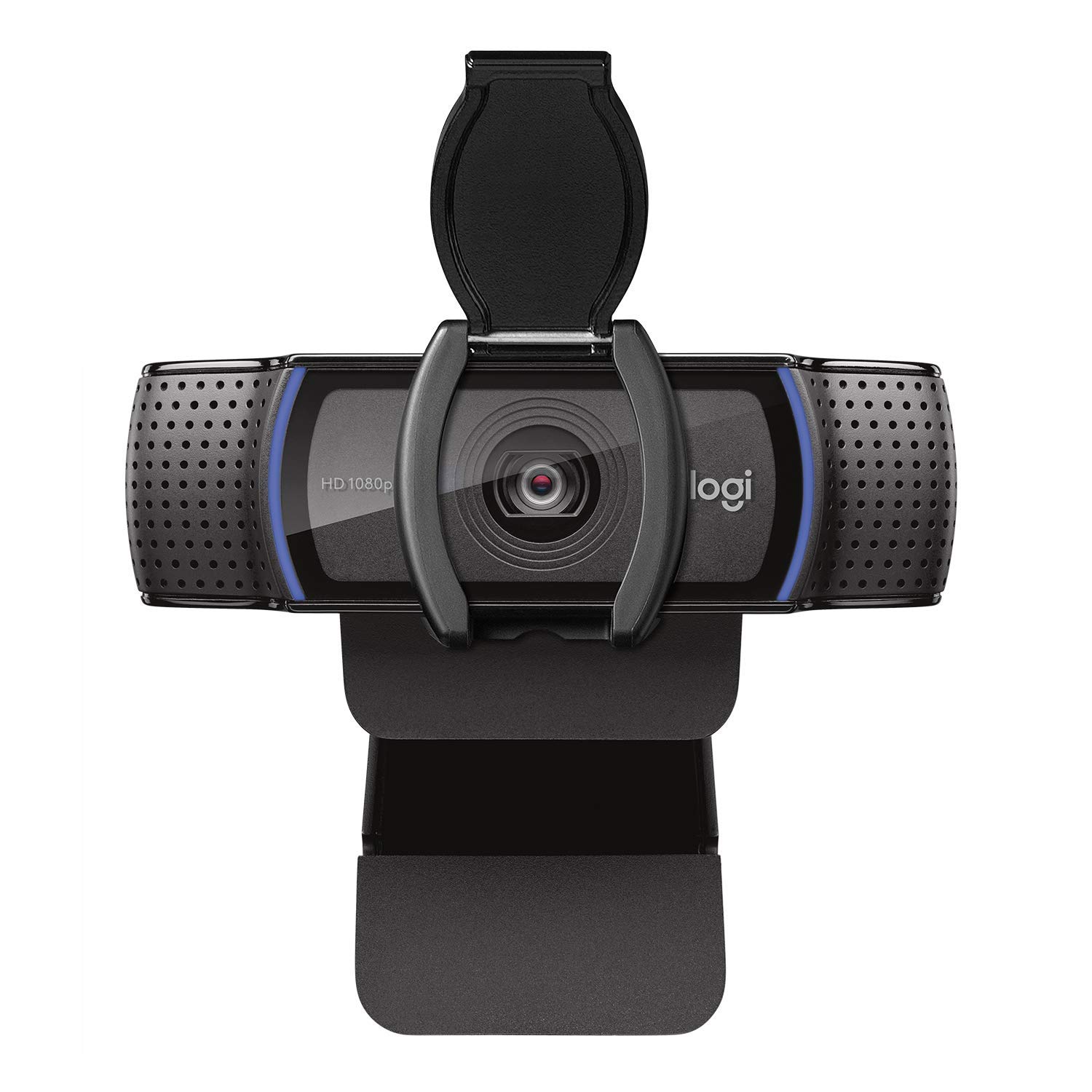
Full HD 1080p video calling and recording · Automatic light correction for clear images in various lighting conditions · Built-in privacy shutter for added security
This webcam ensures you make a professional impression during virtual interviews with its clear video quality and convenient privacy features.

Industry-leading noise cancellation technology · Exceptional sound quality with DSEE Extreme™ · Up to 30 hours of battery life with quick charging
Immerse yourself in your work or block out distractions with these premium noise-canceling headphones, perfect for focused job searching or remote work.

Wireless and mobile printing capabilities · Automatic duplex (2-sided) printing saves paper · Fast print speeds up to 32 pages per minute
Print resumes, cover letters, and other essential documents quickly and efficiently with this versatile and compact all-in-one printer.
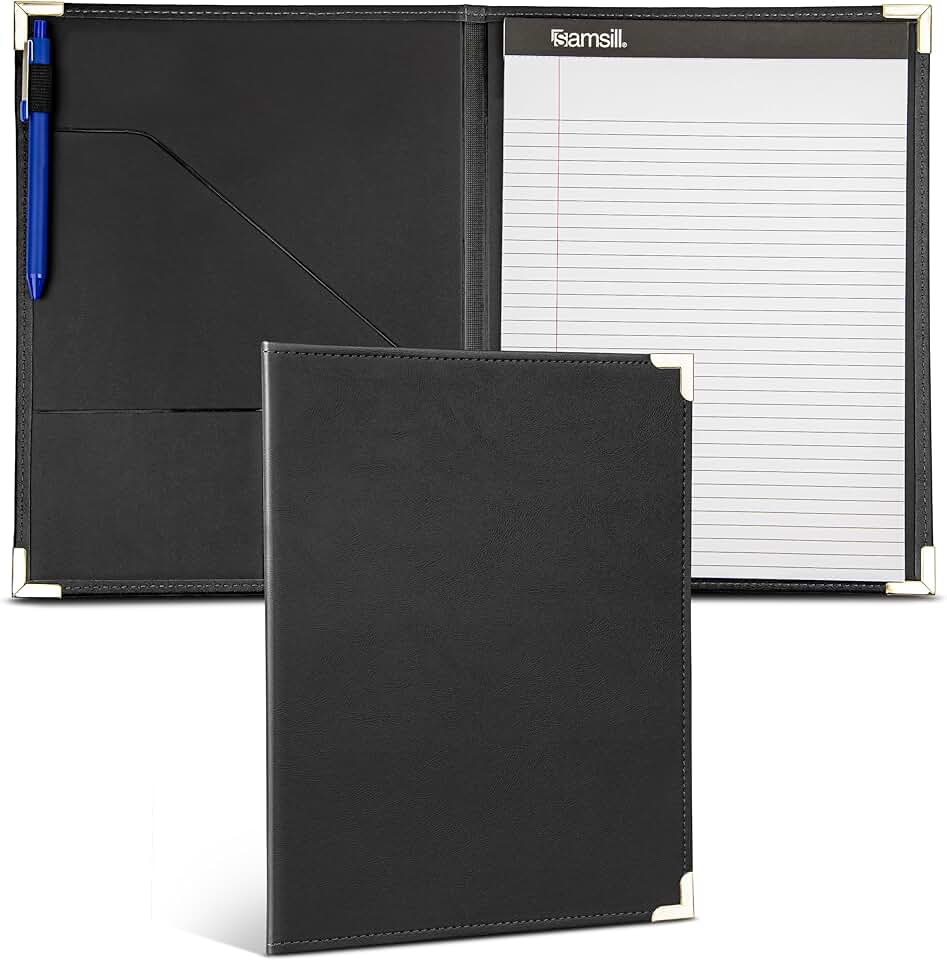
Professional faux leather design with brass corners · Includes an 8.5 by 11-inch legal pad · Organizes resumes, documents, and business cards
Keep your important job search documents organized and present them professionally with this classic business portfolio.
As an Amazon Associate I earn from qualifying purchases. Prices may vary.
No comments yet. Be the first to share your thoughts!